

Why QuickTap?
The whole business. Not just another tool.
Quick Tap connects the everyday operations behind your business, so you spend less time managing systems and more time running your business.
FROM SPREADSHEET TO SHARED WORKSPACE
A careful setup. A confident first day.
Good implementation starts with clean records and a practical plan, not a promise to rush your business live overnight.
Import validation complete. 128 item records mapped. Review opening quantities and unit costs before you publish.
READY FOR YOUR REVIEW
01 /
Discover
Map teams, workflows and the records that need to move.
02 /
Prepare
Review imports, roles, locations and opening balances.
03 /
Launch
Practice your core tasks and agree a controlled go-live.
04 /
Refine
Use your first weeks to tune reports and approvals.
BUILT TOGETHER. NOT BOLTED TOGETHER.
One business. Not four versions of it.
A transaction is more than one team’s task. QuickTap keeps its source record connected to the stock, invoice and financial work that follows.

One transaction. The same context.
ITEM / CUSTOMER / ORDER / TRANSACTION

SALES & POS
The sale is recorded
SO-2048
32 ceramic mugs · Source order

INVENTORY
The stock is updated
QT-0018
Main store · 248 available

RECEIVABLES
The invoice is linked
INV-1048
Receivable linked to the order

ACCOUNTING
The ledger follows
JRN-0842
Sales & cost of goods posted
Illustrative order-to-cash workflow · Sample records, not business performance claims.

And when it’s time to replenish?
Create purchase orders, receive goods and link supplier bills to what arrived. Purchasing stays in the same connected workspace.
See the platform ↗NOT JUST MORE FEATURES. BETTER CONTEXT.
Clarity you can actually work with.
The right information, where the work happens. Here’s what that looks like for the people running your business.
01 / DECISIONS WITH CONTEXT
See the signal. Follow the detail.
Bring sales, stock, margins and cash into a shared view. Then follow the detail behind the number, rather than asking your team for another report.
Explore reporting & insights ↗Business overview
Sales, stock and finance · One shared view
This month⌄
Net sales
$24,500
Orders
128
Gross profit
$8,320
Sales & purchases
● Sales
● Purchases
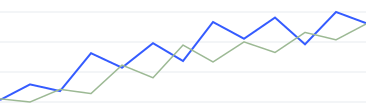
Oct 01
Oct 07
Oct 14
Oct 21
Needs your attention
Low stock
↗
Purchase orders
↗
Invoice reminders
↗
Open workspace →
Illustrative product view · Sample data, not business performance claims.
02 / A SHARED VIEW OF STOCK
Know what’s where. Not just what’s left.
Track variants, reorder points and transfers across locations. Give sales and operations the same stock picture.
Stock by location
View inventory ↗
Item
Location
Available

Ceramic mugs
Main store
248

Ceramic mugs
Warehouse
120

Travel flask
Main store
18
Illustrative item records · Sample quantities
03 / CONFIDENCE WITHOUT BOTTLENECKS
Room to work. The right guardrails.
Give each role the access it needs. Keep approvals and activity traceable, without giving everyone the keys to everything.
Roles & permissions
Example setup ↗
Permission
Cashier
Manager
Create sales
✓
✓
Adjust inventory
—
✓
Approve expenses
—
✓
Permissions can be configured for your team.
01 /
Less duplication
Connected records, not disconnected tools
02 /
More clarity
Daily decisions with the detail behind them
03 /
A considered start
Practical setup, with your team in mind
A DIFFERENT KIND OF EVERYDAY
Your work is connected. Your software should be, too.
Disconnected tools leave your team joining the dots. QuickTap brings the work together, so the next step is already in context.
Everyday friction
When work is disconnected
The QuickTap difference
The same information, again
Retyping a sale into stock sheets and financial records.

A sale updates stock. Financial records follow the same transaction.
Answers in different places
Switching between tools to understand the day.

Sales, stock alerts and financial detail in one shared workspace.
Unclear handovers
Chasing people to find the record—or what changed.

Roles, approval steps and traceable activity keep the context with the work.
Another tool to outgrow
Adding a new system whenever your needs change.

Connected modules and multi-location visibility give your operation room to grow.
QUICK ANSWERS
Good questions. Clear answers.
Need help with your setup? Our team can walk through your requirements.
Talk to our team ↗What does Quick Tap bring together?

What does Quick Tap bring together?
Sales & POS, inventory, purchasing, invoicing, expenses and reporting share one workspace. Growth and Scale add accounting, approvals and multi-location control.
Can I bring my existing data?

Can I bring my existing data?
Yes. Items, customers, suppliers and opening records can be imported from prepared CSV or Excel files. We help you map fields and review the data before go-live.
Do I need to change everything at once?

Do I need to change everything at once?
No. Start with a defined workflow and a reviewed opening position. Your implementation plan can phase in more teams and modules when you’re ready.
MAKE YOUR NEXT MOVE
Your next chapter. One connected business.
See how Quick Tap brings your sales, stock and finances into one clear workspace.
Book a demo

30 minutes. Your business in focus.